Category: nice to know

  • Ranking the rows

    I was asked a few days to write a SQL that would retrieve the one but latest row. Take as an example a few rows below: we have a several functions with their min salary. The question is: which function earns the one but highest minumum salary. In the rows below, we have minimum salary 20000, 15000, 3000 and 8200. The outcome would be the row where the minimum salary 15000 is found as we should disregard the highest number (here 20000).

    JOB_ID JOB_TITLE MIN_SALARY MAX_SALARY
    AD_PRES President
    20000
    40000
    AD_VP Administration Vice President
    15000
    30000
    AD_ASST Administration Assistant
    3000
    6000
    FI_MGR Finance Manager
    8200
    16000

    To this problem, we have two solutions:
    One solution is:

    SELECT rownum, min_salary from 
    (select min_salary from jobs order by min_salary desc)A ;
    

    Here, we order the table first, then return the rows with the rownumber. This could then be filtered on rownumber=2.
    The second solution is:

    SELECT min_salary,
           RANK() OVER (ORDER BY min_salary desc) "rank"
    FROM   jobs;
    

    This makes use of the so-called analytical functions. It leads to the same result: after a filter on RANK()=2, we have the desired row.
  • SQLite

    SQLite is the smallest database server we know. The engine itsself is about 500 KB – considerably less than other engines. It can be downloaded from http://www.sqlite.org/ .
    Once downloaded, it can be started by: sqlite3 test.db. Here, the sqlite3 is the database engine that is called and test.db the database.
    I have downloaded a graphical client ( SQLite2009Pro ), that allows us to maintain the database. Moreover, the client also contains OBDC drivers which allows the exchange of data from different datasources to SQLlite.

    I understand that SQLite is the database that is most widely used in the world. It is contained in MP3 players, cellphones, but also in programmes like Morzilla, PHP etc. Most likely, most users are not even aware that they have a SQLite database as it is embedded software.

    I myself installed everything in about an hour: it is really straightforward.

  • Creating a cookie

    Cookies are small items that can be written on the hard disk of a client computer. In Google Chrome, these cookies can be found in a binary file. I found this file in “C:\Users\tmaanen.CORP\AppData\Local\Google\Chrome\User Data\Default\Cookies”.
    These files can be written on request of the webserver. I wrote a small PHP programme that writes these cookies on the hard disk of the client. The programme reads as:

    ?php
    setcookie("cookie[three]", "cookiethree", time() + 1000);
    setcookie("cookie[two]", "cookietwo", time() + 1000);
    setcookie("cookie[one]", "cookieone", time() + 1000);
    echo "Cookie is set - disappears in 1000secs\n";    
    ?
    

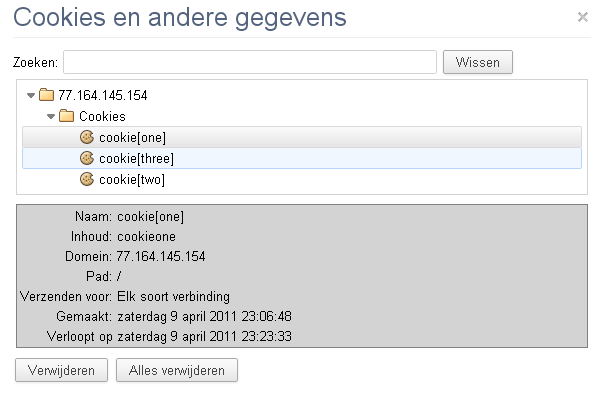
    When this programme was executes on the webserver, a cookie is sent to client computer. There, it can be seen in the options screen that displays cookies:
    Chrome display of cookies

    Once these cookies are stored on the hard disk, we could read them with a programme that is stored on the webserver. An example is given here:

    if (isset($_COOKIE['cookie'])) {
        foreach ($_COOKIE['cookie'] as $name => $value) {
            $name = htmlspecialchars($name);
            $value = htmlspecialchars($value);
            echo "$name : $value 
    \n"; } };

    This PHP programme is executed on request from the client computer. This gives a screen like:

    Return Cookies

  • OLE DB

    Today, I tried to link a ODBC compliant database to a SAS programme. SAS is a programme, much like Perl, that allows data to be read, transformed and written back to a database. SAS claims that it is able to use OLE DB to hook up to ODBC compliant databases. The idea is that the SAS programme is seen as a data consumer, while OLE DB is a dataprovider thru its software that is automatically installed on a windows box.
    When SAS is linked to a database, two questions are asked: what is datasource? and: what is the provider? The helpfile with SAS does not offer you great help: it only indicates that a name of the provider should be given. But what is the name of the provider? And what is the name of the datasource?
    It took me a little while to find the answer:
    1: The name of the datasource is exactly the name of the datasource as used in the ODBC. This can be understood as OLE DB is used here to exchange data via ODBC with the database.
    2: The name of the provider is “MSDASQL.1”. I found this name by looking at the properties in Excel when data were read via OLE DB from an ODBC datasource. There, the properties were given as: “Provider=MSDASQL.1;Persist Security Info=True;User ID=tom;Data Source=MYSQL_THUIS;Extended Properties=”DSN=MYSQL_THUIS;UID=tom;”;Initial Catalog=tom”. That gave me the clue: Provider=MSDASQL.1. Exactly this name was the name, I looked for.

    The idea that connection properties for OLE DB can be easily found in Excel, gave me the idea how to hook up databases via OLE DB to SAS.
    Example: an Access database has these properties when it is linked to Excel: “Provider=Microsoft.Jet.OLEDB.4.0;User ID=Admin;Data Source=D:\tmaanen\Documents\Boekhouding_2002041.mdb;…”. I use these values in SAS to hook up an Access database via OLE DB. See picture for an example on how these properties were used:
    SAS oledb

  • The tragedy of not usings dates

    I now work with a financial institute where they took the decision NOT to use date formats for data-values. This meant that they use 20110310 to indicate the 10th March 2011. It was possible to use a date format but it was decided to use a numerical format.

    Everything goes at a cost. Likewise, misusing a numerical format to store a date value also has its costs. In principle, it is possible to store 20110254 value. It is numerical but this can not be used to store a date. The date 54 February 2011 simply does not exist.

    The organisation uses SAS to handle the data. Hence, we need a SAS expression to check whether the numerical value can be used as a date or not. This means that 20110254 must be seen as a non-sensical date value, whereas 20110310 does make sense. The SAS expression to check the validity is: input(put(input(put(EFFECTIVE_DATE, 8.)yymmdd8.).

    What is lesson to be learned? [1] use date formats for a date. [2] never/ ever think about using a numerical format.

  • Run ODBC

    In some environments, the possibility to create an ODBC link is prohibited. Due to misunderstood security issues, the creation of an ODBC link is not permitted. But is might be that we have a way out!

    Try C:\Windows\SysWOW64\odbcad32.exe to use the 32 bits version and the 64 bit ODBC drivers via: C:\Windows\System32\odbcad32.exe

    And there is a remote chance that you enter the screen to create an ODBC link.

  • send mail via telnet

    I am subscribed to a ADSL provider who also provides Email services. Hence, I could try to send some mail from the command line on my laptop.

    As a first step, I started a telnet session with the provider: from the command line I gave the command: “telnet mail.wxs.nl 25”. The server responded promptly. As response I received: “220 CPSMTPM-CMT103.kpnxchange.com kpnxchange.com Fri, 24 Dec 2010 00:03:22 +0100”.

    My next command was “helo mail.wxs.nl” to contact the mail server. The reply from the mail server was: “250 CPSMTPM-CMT101.kpnxchange.com Hello [77.164.145.154]”.

    As sender, I introduced: “mail from: tom.vanmaanen@wxs.nl”. Apparently I was accepted as a legal sender as the server replied: “250 2.1.0 tom.vanmaanen@wxs.nl….Sender OK”.

    I decided to send a mail to my-self: “rcpt to: tom.vanmaanen@wxs.nl”.

    To start the email, I had to issue the command “data”, upon which the server asked me to start the mail content: “354 Please start mail input.”.

    The mail content started with a subject line: “Subject: test mail”. After this the mail body could be issued: “this is a test”.

    The mail content was finished by a dot “.” on a line.

    After this, the mail was queued for delivery. This was indicated by a response from the mail server: “250 Mail queued for delivery.”. After that I gave “quit” upon which the actual mail was sent.

    What is the benefit of this exercise? At least, it shows me a way to send Emails from the command line. This could also be used to write a program that could send Emails automatically. Such a program should be able to send output to the command line. If similar lines like above would be send, an Email would be sent. This could then be used as a warning mechanism.

  • Google Refine

    I am subscribed to several blogs. One such blog is a blog from Dylan Jones that is maintained from the “Data Quality Pro community”. From this blog I got the suggestion to investigate Google Refine. And it was surely a worthwhile investment.

    Google Refine is a tool that is acquired by Google to improve data quality. When used for this purpose, it is immensely powerful.

    Google Refine can be downloaded here . It is a download of approximately 30 MB. It can be installed on a Windows, Linux and an Apple platform. Installation is straightforward, allthough a Java Runtime Engine is required. Also: installation is free, no costs involved nor a registration. After launching, the application uses the web browser as interface.

    The application is able to read/ write text formatted files. If the data are stored in an Oracle database, one should extract such tables to external text files. After extraction one could load such data in Google Refine. Loading data is easily done: in the interface we may notice the button “open” that reads a file. Subsequently “export” allows to write the data to an external file. I really appreciate such a well thought interface: trivial functions such as reading and writing should be made easily accessible.

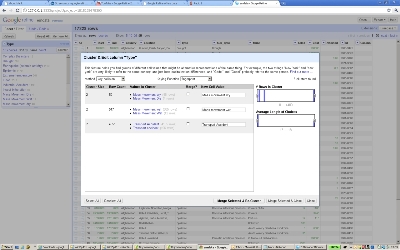
    The data can be analysed when the mouse is positioned at the header of a column. A small drop down list displays itself with “facet”, subsequently “text facet”. Selecting this creates a frequency overview on this column. This allows a quick overview on the domain of the column values. This is functionality that is also known as creating a pivot table. From this moment on, we get access to functionality that is really awesome. This frequency overview can be analysed with a cluster analysis that clearly displays values that closely resembles each other. We know that in many tables different spellings can be used to express the same thing: “Transport Accident” can also be written as “Transport accident”. However a frequency diagram then contains two lines: one for “Transport Accident” and another for “Transport accident”. Google Refine allows to detect such small differences in the cluster analysis automatically. The deviations can also be synchronised automatically. We can then avoid the tedious manual adjustment of values.

  • Moving to Joomla

    Previous pages can be found here
    I had a site previously. This was basically a standard HTML based site to which comments were added over time. Above link brings you back to these pages. But only a few days ago, I discovered Joomla. This Joomla is a template that allows you to add comments and notes. Henceforth, I decided to use this Joomla template. Let us how it works out.

    Hum hum

    I got hacked. Snif. Sorry for Joomla, but I returned to WordPress. Hope it is safer!

  • NAS Server

    Recently I bought a NAS server. Just to store some files, photos and one or two movies that came across. To be honest, I did not realise how much software was added to this NAS. When I opened the admin page, I was almost shocked with the tons of software that came across: MySQL, PHP, FTP, a telnet server, a HTTP server, several download apps, a media player. To see how it worked, I created a small website that gave access to a few application that are installed. See here. Curious how long it takes before this is discovered by those idiots that sell Viagra and pr0n. I will keep you informed.